
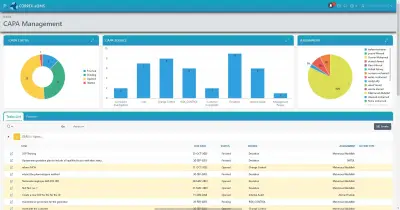
CAPA Software for Root Cause Analysis and Effectiveness Checks
CORPEX-CAPA takes a non-conformity from report to closure through root cause analysis, a tracked corrective or preventive action, and a documented check that the action actually worked.
What Is CAPA Software?
CORPEX-CAPA is the module that runs the corrective and preventive action process at the center of a quality management system.
A CAPA is opened whenever something goes wrong and the organization needs to make sure it does not happen again: a deviation, an audit finding, a customer complaint, an OOS result, or a trend a risk assessment flagged before it became a problem. CORPEX-CAPA is built for QA managers, quality engineers and site heads who need every CAPA to go through the same discipline, a documented root cause, a specific action, and proof it worked, instead of being closed on a promise to "retrain and monitor."

The Regulatory Requirement Behind CAPA
CAPA is not a best-practice suggestion. It is a named requirement in the frameworks pharmaceutical and medical device quality systems are built and inspected against.
ICH Q10 CAPA System
ICH Q10 describes the CAPA system as one of the core enablers of the pharmaceutical quality system, alongside process performance monitoring and change management. It expects root cause investigation proportionate to the risk of the issue, actions that address the root cause rather than just the symptom, and a check that the action was effective.
21 CFR 820.100
For medical device manufacturers, FDA's 21 CFR 820.100 makes the CAPA subsystem an explicit regulatory requirement: procedures for analyzing quality data, investigating causes, verifying or validating that corrective and preventive actions are effective, and documenting the whole record. It is one of the most frequently cited sections in FDA 483 observations against device manufacturers.
How the CAPA Workflow Runs in CORPEX-CAPA
Six capabilities carry a CAPA from the first report through to a closed, effective action.
1. Efficient Reporting
The non-conformity is logged and categorized at the point it is found, with the detail an investigator will need later captured while it is fresh.
2. Root Cause Analysis
The investigation is pushed past the first plausible explanation. Many teams use structured methods such as 5 Whys or a fishbone diagram to keep asking why until they reach the actual origin rather than a convenient symptom.
3. Action Implementation
A corrective action addressing the root cause, and where relevant a preventive action for the same failure mode elsewhere, is defined with an owner and a due date.
4. Progress Tracking
Open actions are tracked against their due dates so a CAPA does not quietly stall after the investigation is written up.
5. Effectiveness Check
Once the action is in place, its outcome is monitored over a defined follow-up period before the CAPA is allowed to close — evidence the problem stopped, not a signature.
6. Analytics
Recurrence and CAPA-aging data surface which failure modes keep coming back, which is usually a stronger signal than any single investigation.

What Inspectors Look For in a CAPA System
An inspector reviewing CAPA records is usually testing one thing: did the investigation actually find a root cause, or does the file stop at "operator error, retrained." They will check whether the corrective action logically follows from the stated root cause, whether a preventive action was considered for the same failure mode elsewhere, whether the effectiveness check happened and what it found, and whether recurring failure modes were ever escalated instead of being closed the same way every time.
A second thing inspectors look for is timeliness. A CAPA that sits open for months with no activity, or one that was closed the same day it was opened without an effectiveness follow-up period, both read as a system that exists on paper but is not actually run. CORPEX-CAPA's progress tracking and analytics are what let a QA manager catch that drift before an inspector does, rather than during the audit itself.
How CAPA Connects to Deviations and Change Control
Very few CAPAs start from nothing — most are triggered by another module in the quality system.
- A deviation that turns out to have a systemic cause, rather than a one-off, is usually escalated into a CAPA.
- When the corrective action means changing a specification, procedure or piece of equipment, that change is routed through change control before it takes effect.
- If the fix is a revised SOP, the new version is issued through document control and the affected staff are retrained.
Deviations, CAPA, change control and document control are modules inside the same CORPEX-eQMS platform, so a CAPA record carries the trail back to where it started and forward to what it changed. That link matters at audit time: an inspector who pulls a deviation and finds it escalated into a CAPA expects to trace the same record through to the change control or document revision it produced, without a gap where someone had to re-key the details into a second system.
Implementation and Validation
CORPEX-CAPA is a GxP-relevant system in its own right, since its records are what an inspector reads to judge whether an organization actually fixes problems. CORPEX provides computer system validation (CSV) services to qualify the module, confirming workflow routing, e-signature behavior and reporting produce the same result every time before it goes live.
CAPA Software in Egypt
CAPA effectiveness is one of the areas Egyptian Drug Authority (EDA) GMP inspectors and EGAC ISO/IEC 17025 assessors probe hardest, because a weak CAPA system is a repeat-finding machine. CORPEX is an Egyptian company headquartered in the New Administrative Capital, and CORPEX-CAPA is deployed with Arabic-language support as part of the wider eQMS software in Egypt.
CAPA Software FAQ
What is CAPA software?
CAPA software manages the corrective and preventive action process required by quality systems such as ICH Q10 and 21 CFR 820.100: logging a non-conformity, investigating its root cause, implementing corrective and preventive actions, and checking that those actions actually worked before the CAPA is closed.
What is the difference between a corrective action and a preventive action?
A corrective action addresses a non-conformity that has already occurred, removing its root cause so it does not recur. A preventive action addresses a potential non-conformity identified before it occurs, such as a trend in near-misses or a risk assessment finding. Both go through the same root-cause and effectiveness-check discipline in CORPEX-CAPA.
How does CORPEX-CAPA check effectiveness?
CORPEX-CAPA tracks the implemented action against the original root cause and monitors outcomes over a defined follow-up period, so a CAPA cannot be closed until there is evidence the corrective or preventive action actually resolved the problem rather than just addressing the paperwork.
How does CAPA connect to deviations and change control?
Many CAPAs originate from a deviation investigation, an audit finding or a complaint. When the corrective action requires modifying a specification, procedure or piece of equipment, that modification is routed through change control before it takes effect, and CORPEX-CAPA, CORPEX-DM and CORPEX-CC are integrated so the handoff is tracked rather than manual.
Is CORPEX-CAPA suitable for both pharmaceutical and medical device requirements?
Yes. CORPEX-CAPA is built around the CAPA principles common to ICH Q10, which underpins the pharmaceutical quality system, and 21 CFR 820.100, the CAPA subsystem required for medical device quality management systems.
Close the Loop on Non-Conformities
Contact our team to see how CORPEX-CAPA fits into your existing quality processes.
Request a Demo