
Document Control Software for GMP-Regulated Companies
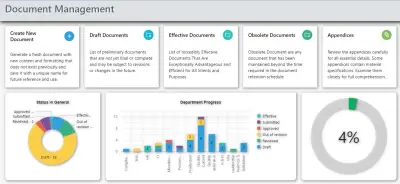
CORPEX-DC controls the lifecycle of your SOPs, work instructions, specifications and forms from first draft to retirement, so the copy your operators use on the floor is always the one QA approved.
What Is Document Control Software?
CORPEX-DC replaces shared drives, printed binders and email approval chains with one controlled system for every document your quality system depends on.
Document control is the backbone of any QMS, because almost every other quality process eventually reads or writes a controlled document: a CAPA closes with a revised SOP, a change control opens because a specification needs updating, an audit finding gets resolved by fixing a work instruction. CORPEX-DC is built for QA managers and document controllers at pharmaceutical, food and chemical manufacturers who need a single place where the current, approved version of a document is always the one people can find and use.
The Regulatory Requirement Behind Document Control
Document control is not an internal-only preference. It is written into the GMP regulations pharmaceutical manufacturers are inspected against.
EU GMP Chapter 4 — Documentation
EU GMP Chapter 4 requires manufacturers to operate a documentation system covering specifications, manufacturing formulae, procedures and records, designed to reconstruct the history of a batch and to prevent errors from verbal or informal communication. It expects documents to be reviewed regularly, kept current, and controlled so an obsolete version cannot be mistaken for the approved one.
21 CFR 211.100 and 211.180
FDA's 21 CFR 211.100 requires written procedures for production and process control that are reviewed and approved by the quality unit before use. 21 CFR 211.180 sets retention requirements for the records generated against those procedures. Between the two, a manufacturer has to prove not just that a procedure exists, but that it was the one approved and in effect at the time a batch was made.
21 CFR Part 11 and Electronic Signatures
If a document is approved electronically, that approval has to meet 21 CFR Part 11: the signature must be unique to one person, attributable, and tied to the specific version of the record it approved, with an audit trail recording who signed, what they signed, and when. A shared login approving a document does not satisfy this, whatever the software claims to do.
How the Document Control Workflow Runs in CORPEX-DC
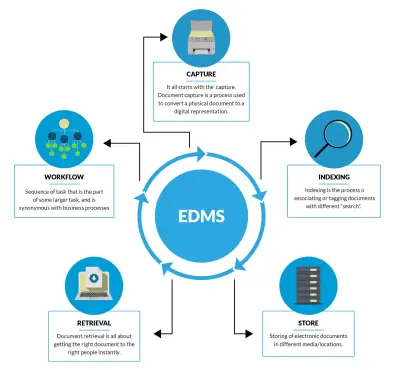
Six capabilities carry a document from first draft to retirement without a manual handoff getting lost.
1. Centralized Repository
The document is authored and stored in one system instead of a personal folder or a shared drive, so there is a single place to search for the current SOP, form or specification.
2. Workflow Automation
The draft is routed through review and approval automatically, following the sequence your procedures require, instead of being chased by email.
3. Electronic Signatures
Each reviewer and approver signs electronically. The signature is attributed to that person and locked to the exact document version they signed.
4. Version Control
On approval, the new version becomes effective and the previous one is automatically superseded, so there is only ever one live version in circulation.
5. Access Control & Security
Role-based permissions decide who can read, edit or approve a given document, so only authorized staff can touch a controlled record.
6. Audit Trail
Every action on the document, from draft through review, comment, approval and supersession, is logged, giving a full record for the next inspection.
What Inspectors Look For in Document Control
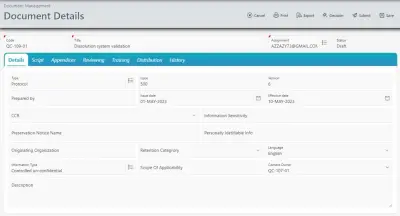
An EDA or FDA inspector pulling a document control thread usually asks a small set of questions: is there a controlled register of every SOP and its current version, is there evidence the version on the floor matches what QA approved, who reviewed and approved each revision and when, and can a superseded copy still be found in active use anywhere. The audit trail, version control and access permissions in CORPEX-DC exist to answer exactly those questions without someone having to reconstruct the history from memory.
How Document Control Connects to the Rest of CORPEX-eQMS
Document control rarely acts alone — it is usually the destination another module writes to.
- When a CAPA closes with a procedural fix, the fix is usually an SOP revision, which routes back into document control.
- A formal request to modify a controlled specification, drawing or master formula is handled through change control before document control issues the new version.
- Once a revised document is effective, the staff who work to it need to be retrained on it, which is where training management picks up the handoff.
Document control, CAPA, change control and training are modules inside the same CORPEX-eQMS software platform, so this handoff does not depend on someone remembering to notify the next department.
Implementation and Validation
Because CORPEX-DC carries GxP records and electronic signatures, it is qualified like any other computerized system in scope for GMP: installation checks, functional testing of the approval workflow and e-signature behavior, and performance testing under real document volumes. CORPEX provides computer system validation (CSV) services covering the IQ/OQ/PQ and traceability documentation an inspector expects to see.
Document Control Software in Egypt
Egyptian Drug Authority (EDA) GMP inspections look closely at controlled documentation and ALCOA+ data integrity, and EGAC ISO/IEC 17025 assessments expect the same discipline for laboratory procedures. CORPEX is an Egyptian company headquartered in the New Administrative Capital, and CORPEX-DC is deployed with Arabic-language interface and support alongside English, as part of the wider eQMS software in Egypt.
Document Control Software FAQ
What is document control software?
Document control software is the system that manages the full lifecycle of controlled documents such as SOPs, work instructions, specifications and forms, from drafting and review through approval, distribution, periodic review and retirement, with version control and an audit trail so only the current approved version is ever in use.
Is CORPEX-DC compliant with 21 CFR Part 11 for electronic signatures?
Yes. CORPEX-DC includes electronic signatures for document approval, built to align with FDA 21 CFR Part 11 requirements for accurate, attributable and secure electronic records and signatures, alongside role-based access control and a complete audit trail of every action taken on a document.
How does document control connect to CAPA and training?
A CAPA that closes with a procedural fix usually requires an SOP revision, which routes back through document control. Once a revised document is approved, the people who work to that SOP need to be retrained on it — CORPEX-DC, CORPEX-CAPA and CORPEX-TM are built to work together so that loop does not depend on someone remembering to update it manually.
Does CORPEX-DC support EU GMP Chapter 4 documentation requirements?
CORPEX-DC is designed around the documentation-system principles in EU GMP Chapter 4 — a controlled repository, version control that prevents obsolete copies from being used, and an audit trail that lets an inspector reconstruct who changed what, when and why.
Can CORPEX-DC be validated for EDA GMP inspections in Egypt?
Yes. CORPEX provides on-site computer system validation (CSV) services for CORPEX-DC in Egypt, producing the IQ/OQ/PQ, e-signature testing and traceability documentation an Egyptian Drug Authority (EDA) inspector or EGAC assessor expects to see.
Take Control of Your Documentation
Contact our team to see CORPEX-DC and how it fits into your existing quality processes.
Request a Demo